
91 Club Game Download APK [Real Earning App] For Android
6.7MB
V1.0.6
15k
Description
91 Club is a secure online gaming platform Where user can play popular games such as Wingo, K3, 5D, and Aviator & earning exciting real rewards through skill based gameplay and easily login 91 Club users can test their luck and skills through easy-to-play games and earn real rewards along with exciting prizes.
In this guide, you’ll discover everything about 91 Club login, including registration steps, app download, features, and how the platform works.ways to earn rewards, and how to withdraw your earnings quickly and securely. Stay connected with APK SOLO for latest Earning Games in india.
Why Choose 91 Club?
91 Club is a modern and fast-growing online gaming platform that offers a variety of prediction-based and interactive games such as Wingo, K3, 5D, Slots, Plinko, Limbo, and Aviator
How 91 Club Platform Works
- Create your account using your mobile number
- Complete verification through OTP confirmation
- Add funds to your wallet securely
- Select from popular games like Colour Prediction, WinGo, K3, 5D, Slots, , or Aviator
- Place your entry before each round begins
- Game results are generated automatically by the system
- Your winnings are credited instantly to your wallet
- withdraw your earnings quickly after completing the required conditions
How to Register on 91 Club (Easy Steps)
Getting started on 91 Club is simple, fast, and beginner-friendly. Follow these steps to create your account:
- Visit the official 91 Club registration page using your mobile or desktop browser
- Enter your active mobile number to begin the signup process
- Create a strong and secure password for your account
- Complete OTP verification sent to your registered mobile number
- Enter a referral or invite code (optional) to unlock bonus benefits
- Finish the registration and start exploring games on 91 Club
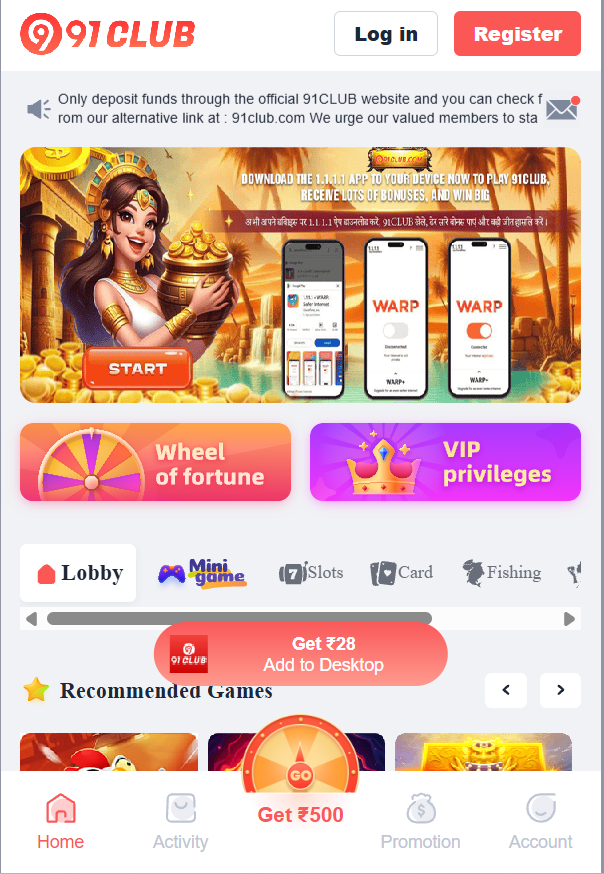
91 Club Login – How to Sign In
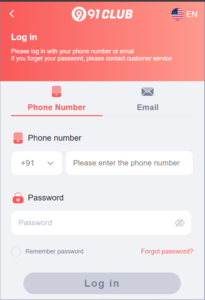
Logging into 91 Club Lottery Game is quick and hassle-free. If you already have an account, follow these simple steps:
- Open the official app or access the trusted website
- Tap on the Login option available on the homepage
- Enter your registered mobile number and password
- Click on Sign In to access your account instantly
After logging in, you can easily check your wallet balance, explore different game categories, and track your activity in one place.
91 Club App Download & Installation Guide
Downloading and installing the 91 Game on your Android device is quick and easy. Since the app is provided as an APK file, users need to download it from the official source and install it manually for secure access.
Steps to Download and Install 91 Club App
Follow these simple steps to install the app safely:
- Visit the official website
- Click on the Download App or APK Download option
- Wait for the APK file to download on your device
- If prompted, go to Settings → Security / Privacy
- Enable Install from Unknown Sources
- Open the downloaded APK file
- Tap on Install to begin the installation process
- Once installed, open the app
- Register a new account or log in with your existing details
Game Categories on 91 Club
91 Club offers a variety of game categories to match every player’s interest and style. Whether you like quick prediction games for instant action or prefer relaxing with casual games, there’s something for everyone here.
Colour Prediction & Lottery Games
Explore fast-result prediction and lottery-style games on, designed for users who enjoy quick rounds, simple choices, and smooth gameplay.
Instant Play Entertainment Games
Enjoy instant play games that are perfect for short gaming sessions, offering a simple interface, quick access, and responsive performance on every device.
Slots & Casino Style Games
Discover engaging slots and casino-style games with interactive layouts, exciting features, and a smooth gaming experience for regular and new users.
Popular & Trending Games
Access some of the most played and trending 91Club games that remain popular among users looking for fast entertainment and easy game selection.
Card & Arcade Gaming Options
Try a mix of card-based and arcade-style games created for casual players who prefer light, entertaining, and easy-to-enjoy gaming categories.
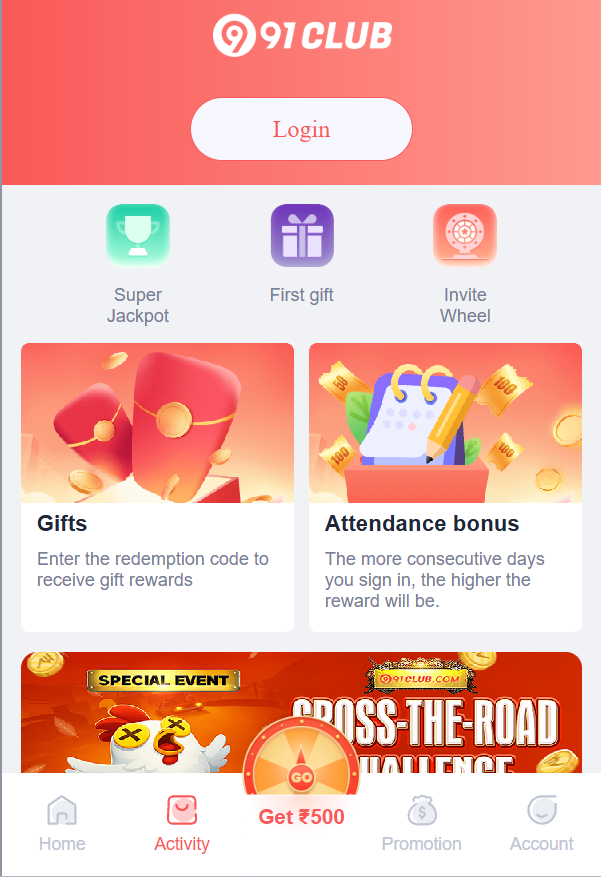
How to Deposit Money in 91 Club
Adding funds to your 91 Club is quick, simple, and convenient. The platform provides smooth payment options, allowing users to recharge their account without delay and continue enjoying their favorite games without interruption.
Steps to Add Balance
- Open your 91 Club and log in using your registered mobile number
- Go to the Wallet or Recharge section from the main dashboard
- Tap on the Deposit or Add Balance option
- Enter the amount you want to add to your wallet
- Select a preferred payment method such as UPI, QR Code, or digital wallet
- Confirm the payment and follow the on-screen steps to complete the transaction
Once the payment is successful, your wallet balance is updated instantly, so you can access games and continue playing without waiting.
How to Add Bank Account in 91 Club
Linking your bank account on 91 Club is simple and helps you manage withdrawals smoothly. Follow these easy steps to add your bank details securely:
Step-by-Step Process
Login to 91 Club Account
Open the official 91 Club app or website and sign in using your registered mobile number and password.
Go to Wallet or Profile Section
After logging in, navigate to the Profile or Wallet section from the main dashboard.
Select “Add Bank Account” Option
Look for the Bank Account or Add Account option inside the withdrawal or payment settings.
Enter Your Bank Details
Fill in the required information carefully:
- Account Holder Name
- Bank Name
- Account Number
- IFSC Code
Confirm and Submit Details
Double-check all the entered information and submit the form.
Complete Verification (If Required)
In some cases, may ask for OTP verification or basic confirmation to secure your account.
How to Play Wingo Colour Prediction on 91 Club
Wingo is one of the most popular fast-paced games on 91 Club, where players make quick predictions on colours or numbers within short time intervals
Steps to Play Wingo on 91 Club
- Log in to your account using your registered mobile number
- Open the Wingo section from the main dashboard
- Select a round duration such as 30 seconds, 1 minute, 3 minutes, or 5 minutes
- Choose your prediction type:
- Colour (Red, Green, Violet)
- Number (0–9)
- Enter your preferred amount and confirm your prediction before the timer ends
- Wait for the round result to be announced
- If your prediction is correct, your winnings are added instantly to your 91 Club wallet
91 Club Refer & Earn Program
The Refer & Earn program is a smart way to increase your rewards by inviting others to join the platform. It allows users to earn extra benefits while sharing the gaming experience with friends and growing their network.
By bringing new players to 91 Club, you can unlock bonus rewards and create a consistent earning opportunity based on your referrals’ activity.
How to Use 91 Club Referral Program
- Follow these simple steps to start earning:
Open the Refer & Earn or Invite Friends section in your 91 Club account - Copy your personal referral link or unique invite code
- Share it with friends, family, or online communities
- Ask them to register using your referral link
- Once they join and start playing, your referrals will be tracked automatically
- Earn bonuses and rewards based on their activity on 91 Club
- The more users you invite to 91 Club, the more rewards you can unlock, making it an easy and effective way to earn alongside your gameplay.
Why Should You Choose 91 Club as an Agent?
Choosing the right platform as an agent is important for long-term growth and a smooth experience. 91 Club offers a user-friendly system along with competitive benefits that make it a preferred choice for many users.
Permanent Salary System for 91 Club Agents
91 Club offers a permanent salary system for active agents, allowing them to earn daily rewards based on total team deposit performance. With higher team growth and stronger deposit volume, agents can unlock bigger daily salary benefits and build a stable earning opportunity.
How to Withdraw Money from 91 Club
Withdrawing your earnings from 91 Club is simple, fast, and secure. The platform offers smooth withdrawal options, allowing users to transfer their winnings directly to their bank account or UPI ID without any hassle.
Steps to Withdraw Money
Step 1: Log in to Your Account
Open the official 91 Club app or website and sign in using your registered mobile number and password.
Step 2: Go to Wallet Section
Navigate to the Wallet or Withdraw section from your dashboard.
Step 3: Select Withdrawal Method
Choose your preferred withdrawal option:
- Bank Account
- UPI ID
Step 4: Enter Withdrawal Amount
Enter the amount you want to withdraw based on the platform limits.
Step 5: Submit Your Request
Review all details carefully and click on the Withdraw button to complete your request.
Withdrawal Details
- Minimum Withdrawal: Starts from around ₹100 (may vary)
- Maximum Limit: Depends on your account level or platform rules
- Processing Time: Usually processed within a few hours
- Daily Limit: A limited number of withdrawal requests may be allowed per day
How to Contact 91 Club Customer Support
To contact customer care, you can use the official app or website and access the support section easily. Follow the steps below:
Steps to Contact Support
Submit your request
- Open the app or visit the official website
- Go to the Contact Us / Support section
- Click on the support link to open the live chat or help center
- Enter your 91 Club UID number to identify your account
- You will see two support options:
- Self Service Center
- Customer Support / Help Option
Select your issue from the available options
Fill in the required details about your problem .After submitting for review, you can use [Question in progress] to view the review results of the work order you submitted.
Important Disclaimer
This website is not the official website of 91 CLUB Game or its mobile application. We do not own, operate, manage, or have any connection with 91 CLUB or any third-party gaming platform mentioned on this website.
The content published here is created only for educational, informational, and awareness purposes, including guides related to APK downloads, login information, registration tutorials, and general platform awareness.
We do not recommend using gaming or prediction applications, especially platforms involving deposits, betting, or financial risk.
Financial Risk Warning
Online gaming and prediction-based apps may involve high financial risk, and users can potentially lose money. Winning outcomes are never guaranteed, and losses may occur more frequently than expected.
For this reason, we strongly advise users to:
- Avoid depositing money without understanding possible risks
- Never treat gaming platforms as a source of income
- Use caution before sharing personal or financial information
- Understand that participation is entirely at their own responsibility
If a user still chooses to use any third-party platform, they do so at their own risk.
Conclusion
91 Club offers a smooth and easy-to-use platform for fast-paced and prediction-based games. With simple registration, quick payments, and multiple game options, it provides a convenient experience for both new and regular users.
By using the platform wisely and staying in control, users can enjoy a balanced and enjoyable gaming experience.
Images
Download links
How to install 91 Club Game Download APK [Real Earning App] For Android APK?
1. Tap the downloaded 91 Club Game Download APK [Real Earning App] For Android APK file.
2. Touch install.
3. Follow the steps on the screen.